25/12/2023
This was based on a clip I saw on social media, where I thought, "Oh that's kinda cool, let's try and make that." The original was written in some flavour of C, I didn't check closely and he compiled images into a video to be stored on YouTube as a free alternative cloud storage solution.
Basic Principles
The basic principle is that data is stored as numerical values. At the most basic level, 1s and 0s are used to represent ON or OFF, alternatively True or False, a boolean value. Different arrangements of 1s and 0s result in different numbers and values which can depend on specific datatypes used to store information.
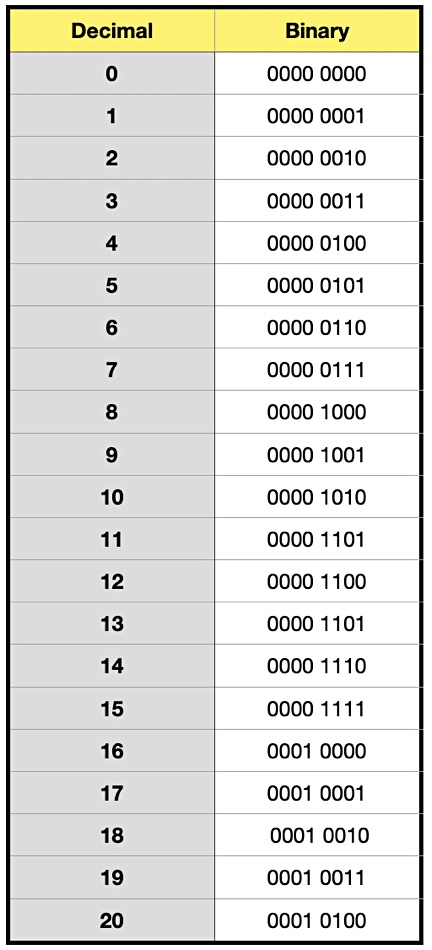
For example 1 in binary is represented as 0000 0001, 2 is 0000 0010, 3 is 0000 0011 and so forth. By using flipping bits, 256 different numbers can be stored using 8 bits. Using the np.uint8 datatype in Python when binary reading files allows for each character to be stored as a value between 0 and 255 therefore fitting within each byte. Each byte represents one of the RGB values of a pixel hence a pixel holds 3 bytes of information and a 770 by 433 image holds roughly 1MB of information visually. Obviously by using either JPEGs, videos or other forms of lossy compression information can be lost therefore lossless methods such as PNGs are required to ensure the integrity of data.
Problems that were Overcome
There were a few issues identified on the way. For example, the program needs to determine what a suitable image resolution would be such that it does not store more redundant zeros than required but also that visually the image is clearly able to fit within the screen of a normal computer or phone because it would be impractical to have an extremely long image as it could not all be viewed at once. This was a simple problem to deal with as it was just some simple math that solved the problem. This math essentially identified an optimal width value for the total number of pixels, using the underlying principle that width x height = total number of pixels and that the aspect ratio between should be roughly 16:9.
Another symptom of this picky resolution is that null bytes have to be added to the end of the image. Therefore information was added onto the begin, as well as served as an opportunity for the file name to be added onto it so that it is in the picture and therefore can be used for when the file is being decoded. Instead of just encoding the number digit by digit which would be highly inefficient. A version of flipping bits was used, just instead of 1s and 0s numbers between 0 and 255 were used. Allowing for a much larger number to be stored. Therefore allowing for greater theoretical image resolutions.
Another issue that need to be solved, which took a bit of troubleshooting was that initially the plan was to take the text, encoded and convert each letter into uint8 although this would prove to be an issue because unicode has roughly 150 000 characters and therefore not every character could be stored as a single uint8 therefore the data must be encoded. Eventually this became a horrible rabit hole. The solution in the end was the encode the information from binary/hex to uint8 therefore avoiding the encoding issue
Where can you find it
Usage
This was my first time using Github actions to create docker images that people can download from a public Github Package repository. This means that every time there is a change made to the repository a new docker image is created and therefore there will always be an up-to-date image. This will allow others to use it more easily.
Python
Running it on python is relatively simple, Using git pull https://github.com/LovingTech/Image-datastorage.git in any folder of the users choosing, and then running the examples and reading the docs found on Github. Explaining how to use it.
Docker (Prefered Method)
docker run -d -p 8501:8501 ghcr.io/lovingtech/image-datastorage
Then open a browser and go to http://localhost:8501 where you will be presented with a simple menu to pick between encoding and decoding. Then it is as simple as placing an image into the upload and waiting for the result.